
Every project management tool promises a “generous free plan” — until you hit the wall. Three team members in, you discover the timeline view costs extra. Or your message history vanishes after 90 days.
I’ve tested dozens of PM tools over 12 years of managing marketing teams. Most free plans are glorified trials designed to frustrate you into upgrading. But some are genuinely useful for small teams and solo operators.
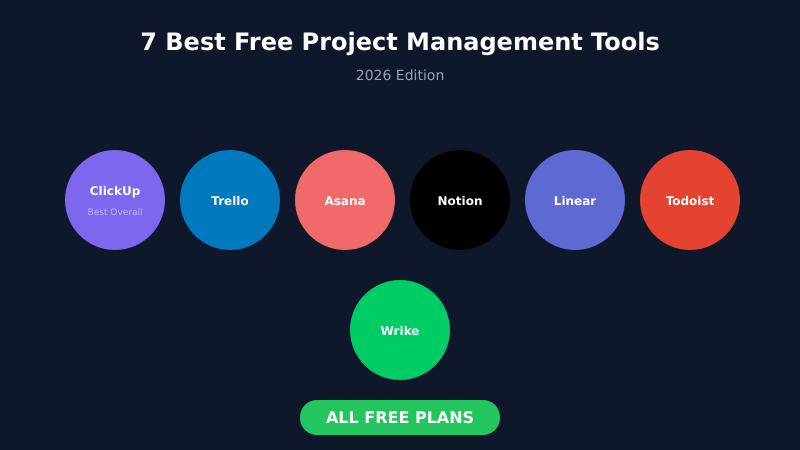
Here are 7 project management tools with free plans that actually work in 2026 — with honest breakdowns of what you get and where the limits bite.
What Makes a Free Plan Actually Useful?
Before diving in, here’s what separates a good free tier from a frustrating one:
Reasonable user limits. A “free plan for 2 users” isn’t really free for teams. Look for 5+ users minimum, or unlimited.
Core features included. If you can’t assign tasks, set due dates, and see progress without paying, the free plan is useless.
No artificial time limits. Some tools delete your data after 90 days or limit history. That’s not free — it’s a trial.
Workable storage. Attaching files is basic functionality. Tiny storage caps (under 100MB) make the tool impractical.
The 7 Best Free Project Management Tools
1. ClickUp — Best Overall Free Plan
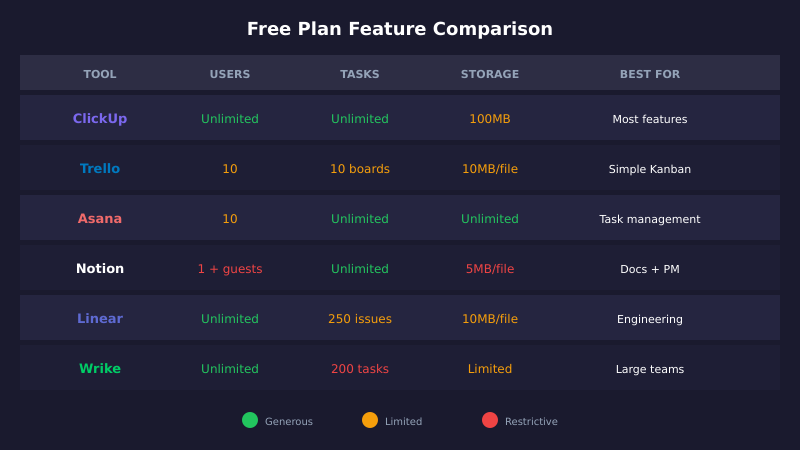
ClickUp offers the most feature-rich free plan in the market. You get unlimited tasks, unlimited users, and access to nearly every feature — just with usage limits on some advanced capabilities.
What you get free:
- Unlimited tasks and unlimited members
- Kanban boards, list view, calendar view
- Collaborative docs and whiteboards (60 max)
- Sprint management and time tracking (limited)
- 100 custom field uses
- Native integrations with Slack, Google Drive, GitHub
- Mobile apps for iOS and Android
Where it limits you:
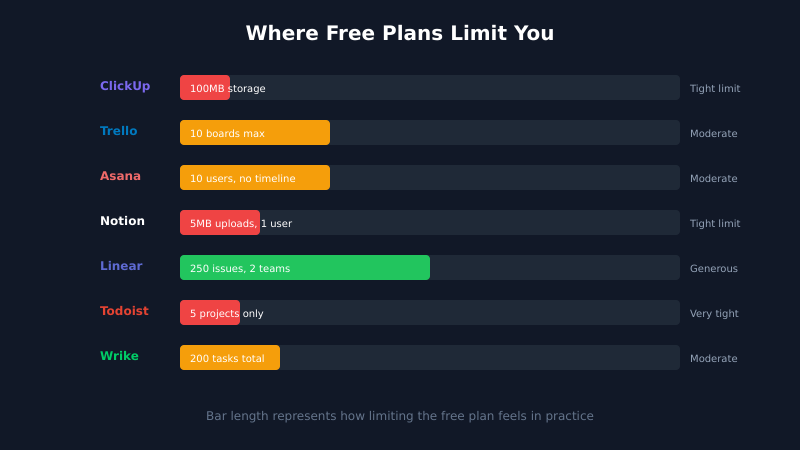
- 100MB storage (very tight for teams with attachments)
- 5 Spaces maximum for organization
- 100 Gantt chart and dashboard uses
- No granular permissions — all users are equal
Best for: Small teams who want maximum features without paying. The storage limit is the main pain point.
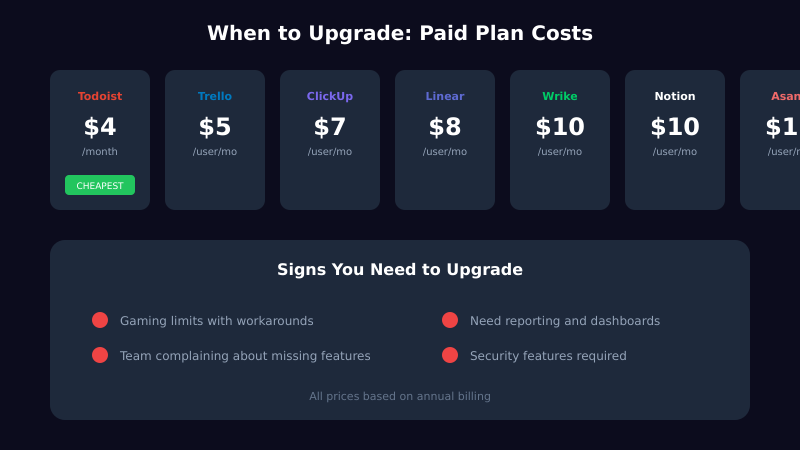
Upgrade trigger: When you need more storage or hit the custom field limit. Paid plans start at $7/user/month.
2. Trello — Best for Visual Simplicity
Trello pioneered Kanban boards for project management. Its free plan is straightforward: you get boards, lists, and cards with minimal complexity.
What you get free:
- Unlimited cards and lists
- Up to 10 boards per workspace
- Unlimited Power-Ups (integrations) per board
- Built-in automation (250 command runs/month)
- 10 collaborators per workspace
- Unlimited personal boards
- Mobile apps and desktop apps
Where it limits you:
- 10MB file attachment limit
- 10 boards per workspace
- No timeline or calendar views
- Limited automation runs
Best for: Teams who love Kanban and don’t need complex project views. Perfect for content calendars, simple sprints, and personal task management.
Upgrade trigger: When you need more than 10 boards or advanced views. Standard plan is $5/user/month.
3. Asana — Best for Task-Heavy Teams
Asana excels at task management with multiple views. The free plan is solid for individuals and tiny teams, though recent changes reduced the user limit.
What you get free:
- Unlimited tasks, projects, and messages
- Unlimited file storage (100MB per file limit)
- List, board, and calendar views
- Basic search and filters
- Mobile apps for iOS and Android
- Over 100 integrations
Where it limits you:
- Maximum 10 teammates (down from 15)
- No timeline or Gantt views
- No custom fields
- No task dependencies
- No workflow builder or automation
Best for: Small teams focused on task tracking without complex dependencies. Great for marketing teams managing campaigns and content.
Upgrade trigger: When you need timeline views, dependencies, or more than 10 users. Starter plan is $10.99/user/month.
4. Notion — Best for Docs + Projects Combined
Notion blurs the line between documentation and project management. Its free plan is excellent for individuals who want one tool for notes, wikis, and task tracking.
What you get free:
- Unlimited pages and blocks
- Database views (table, board, calendar, gallery, timeline)
- Basic page sharing and collaboration
- 5MB file upload limit
- 7-day page history
- AI features (limited trial)
- Templates for project management
Where it limits you:
- Limited to 10 guest collaborators
- 5MB file uploads (very small)
- No admin tools or advanced permissions
- Single member workspace
Best for: Solo operators who want project management inside their knowledge base. Students get Plus plan free with .edu email.
Upgrade trigger: When you need team collaboration or larger file uploads. Plus plan is $10/user/month.
5. Linear — Best for Engineering Teams
Linear is the fastest issue tracker available. Engineers love it for its keyboard shortcuts, clean UI, and thoughtful workflow. The free plan is surprisingly complete.
What you get free:
- Unlimited team members
- 250 active issues (archived don’t count)
- 2 teams maximum
- All core features: cycles, projects, roadmaps
- GitHub and GitLab integration
- Slack integration
- API access
Where it limits you:
- 250 active issue limit
- 2 teams only
- 10MB file uploads
- No advanced security controls
Best for: Startups and dev teams who want a modern, fast issue tracker. You won’t feel like you’re using a limited version.
Upgrade trigger: When you hit 250 active issues or need more teams. Basic plan is $8/user/month.
6. Todoist — Best for Personal Task Management
Todoist isn’t a full PM tool — it’s a task manager. But for personal productivity and small collaborations, the free plan handles the basics well.
What you get free:
- 5 active projects
- 5 collaborators per project
- Smart Quick Add (natural language input)
- Basic reminders
- Cross-platform sync (web, mobile, desktop)
- Basic priority levels
Where it limits you:
- Only 5 projects (hard limit for most teams)
- No labels or filters
- No calendar view
- No time blocking
- Limited collaboration features
Best for: Individuals managing personal tasks or freelancers with simple needs. Not suitable for team project management.
Upgrade trigger: When you need more than 5 projects. Pro plan is $4/month — one of the cheapest upgrades.
7. Wrike — Best for Unlimited Users
Wrike offers unlimited users on its free plan — rare in this category. The trade-off is a 200-task limit, which works for smaller projects.
What you get free:
- Unlimited users
- 200 active tasks (including subtasks)
- Board and table views
- Task management basics
- File sharing
- Mobile apps
- AI features (free until April 2026)
Where it limits you:
- 200 active tasks total (tight limit)
- One shared space only
- No Gantt charts
- No automation
- No request forms
Best for: Teams who need many collaborators but have limited active tasks. Good for simple approvals and creative projects.
Upgrade trigger: When you hit 200 tasks. Team plan is $10/user/month.
Quick Comparison Table
| Tool | Users | Projects/Tasks | Best Feature | Biggest Limit |
|---|---|---|---|---|
| ClickUp | Unlimited | Unlimited tasks | Most features | 100MB storage |
| Trello | 10 | 10 boards | Simple Kanban | No timeline view |
| Asana | 10 | Unlimited | Task management | No dependencies |
| Notion | 1 + guests | Unlimited pages | Docs + PM combo | 5MB uploads |
| Linear | Unlimited | 250 active issues | Speed and UX | 2 teams max |
| Todoist | 5/project | 5 projects | Personal tasks | 5 project limit |
| Wrike | Unlimited | 200 tasks | Unlimited users | 200 task cap |
How to Choose the Right Free Tool
For maximum features with small teams: Start with ClickUp. You get the most functionality, and the storage limit only matters if you attach lots of files.
For visual Kanban workflows: Trello remains the simplest option. It does one thing extremely well.
For task-focused teams: Asana’s free plan handles task management without complexity, as long as you have under 10 people.
For solo operators: Notion lets you combine documentation and project tracking in one place.
For engineering teams: Linear’s free plan feels premium. The 250-issue limit is generous for startups.
For personal productivity: Todoist is lightweight and fast — just accept the 5-project limit.
For large teams with simple needs: Wrike’s unlimited users work if your task count stays under 200.
When Free Plans Stop Working
Free plans fail predictably. Watch for these signs:
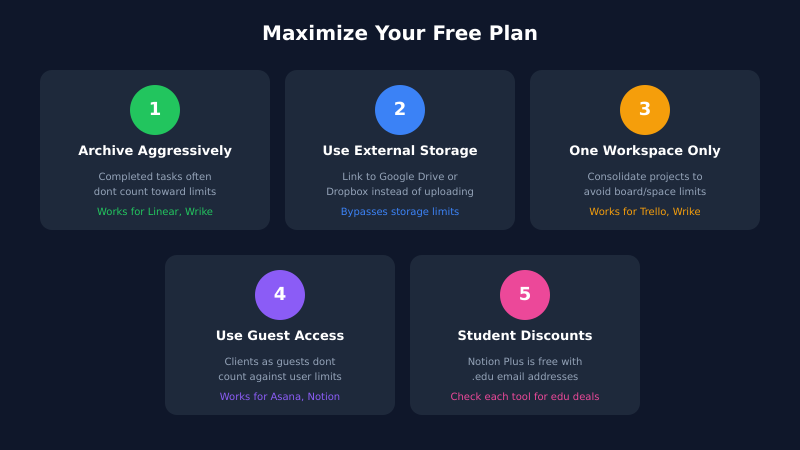
- You’re gaming the system. Archiving tasks to stay under limits, deleting history, creating workarounds — that’s a sign you’ve outgrown free.
- Team friction increases. Missing features cause process problems. If people start complaining, the upgrade cost is worth it.
- You need reporting. Most free plans lack meaningful analytics. When stakeholders want dashboards, you’ll need to pay.
- Security becomes critical. Free plans rarely include SSO, audit logs, or advanced permissions. Growing teams need these.
The goal isn’t to stay free forever — it’s to validate the tool works for your team before committing budget.
FAQ
Which free PM tool has the most users allowed?
ClickUp, Linear, and Wrike all offer unlimited users on their free plans. ClickUp and Linear have task/issue limits instead, while Wrike caps you at 200 active tasks.
Can I use these tools for client projects?
Yes, but with caveats. Trello and Asana allow guest access. Notion has limited guest collaborators. For client-heavy work, you’ll likely need paid plans for proper permissions and branding.
Are free plans secure enough for business use?
For basic use, yes. All listed tools use encryption and have reasonable security. However, free plans typically lack SSO, audit logs, and advanced permissions — features regulated industries may require.
What happens to my data if I don’t upgrade?
These tools don’t delete your data for staying on free plans. You just can’t create new items once you hit limits. Your existing work remains accessible.
Which tool is best for complete beginners?
Trello is the simplest — you’ll understand it in minutes. Todoist is also beginner-friendly for personal tasks. ClickUp has the most features but the steepest learning curve.
Final Verdict
For most small teams, ClickUp offers the best free experience — unlimited tasks, unlimited users, and nearly every feature. Just manage your storage carefully.
If you want simplicity, Trello still does Kanban better than anyone. And if you’re building software, Linear‘s free plan feels like a premium product.
The honest truth: free plans work well for teams under 10 people with straightforward workflows. Once you need reporting, automation, or advanced permissions, budget $7-10 per user per month. That’s the real cost of project management software — and it’s worth it when you’re ready.

|
Written by
Marcus Webb
Marketing strategist with 12+ years of experience. I test tools so you do not waste money on software that does not deliver. More about me → |