HubSpot Free CRM: What You Actually Get (And What’s Missing)
 Marcus Webb
15 min read
Marcus Webb
15 min read
I’ve tested dozens of CRMs over my 12 years in marketing, and HubSpot keeps coming up in every “best free CRM” list. The promise sounds incredible: a powerful CRM platform, completely free, forever.
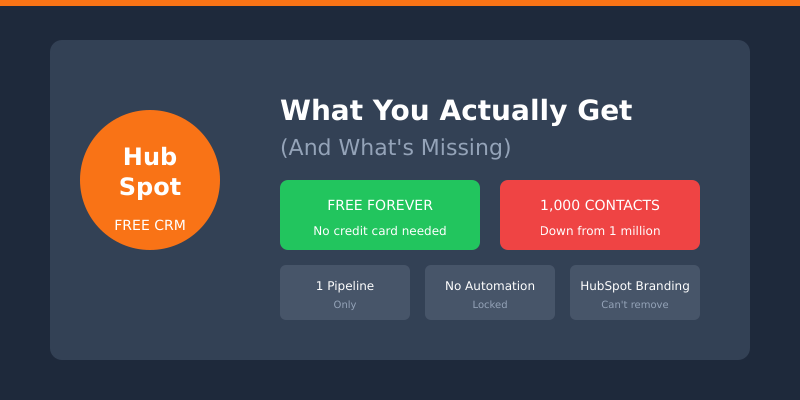
But here’s what those lists don’t tell you: HubSpot’s free plan has gotten significantly more restrictive. In 2024, they quietly dropped the contact limit from 1 million to just 1,000. That’s a 99.9% reduction. Less discussed, and arguably worse for a growing team: the free CRM is capped at two users. Hire a third salesperson and the free plan is over.
I’ve been using HubSpot CRM for years — both the free and paid versions. In this review, I’ll show you exactly what you get for free, what’s locked behind paywalls, how free compares with the first paid tier, and whether it’s worth starting with HubSpot if you know you’ll eventually need to pay. Every number below was checked against HubSpot’s own pricing pages the week this was last revised.
What is HubSpot Free CRM?
HubSpot CRM is a customer relationship management platform that helps businesses track contacts, manage deals, and organize their sales pipeline. The free version gives you access to basic CRM features without paying anything — at least in theory.
HubSpot positions itself as an “all-in-one” platform covering marketing, sales, service, and content. The free tier touches all of these areas, but with significant limitations in each one.
What makes HubSpot different from other free CRMs:
- It’s genuinely free forever (no 14-day trial)
- Includes basic tools across marketing, sales, and service
- Has a polished, user-friendly interface
- Integrates well with Gmail, Outlook, and hundreds of apps
- Scales into paid plans when you’re ready
The catch? HubSpot makes money when free users upgrade. So the free plan is designed to get you hooked on the platform — then hit limitations right when you need features most.
What the Free Plan Includes
Let’s be fair: HubSpot’s free plan does include real, usable features. Here’s what you genuinely get without paying:
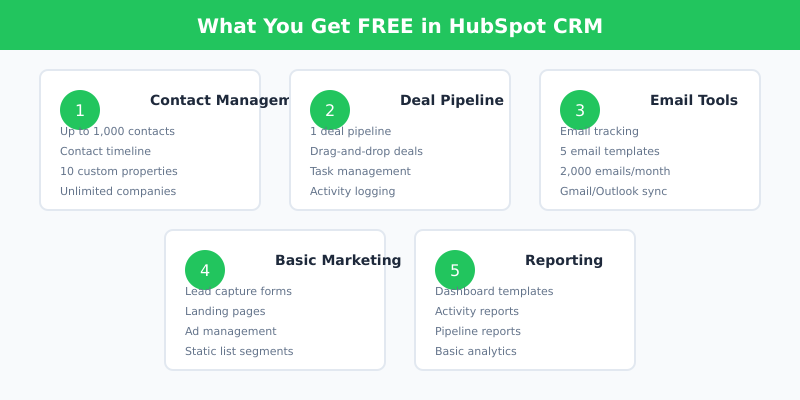
Contact Management
- Store up to 1,000 contacts (reduced from 1 million in 2024)
- Unlimited companies and deals
- Contact timeline showing all interactions
- Basic contact properties (name, email, company, etc.)
- Up to 10 custom properties to track additional data
Seats
- Up to 2 users on the account, no credit card required
- Both seats get the full free feature set — there’s no “admin plus viewer” split
- A third person means a paid seat, and paid seats start the whole pricing conversation
Deal Pipeline
- 1 deal pipeline with customizable stages
- Drag-and-drop deal management
- Basic deal tracking and forecasting
- Task and activity logging
Email Tools
- Email tracking (open and click notifications)
- Up to 3 email templates per account — not per user
- Up to 5 canned snippets for repeated paragraphs
- 2,000 marketing email sends per calendar month, account-wide, with HubSpot branding
- Gmail and Outlook integration
Calling and Meetings
- 500 minutes of calling per month from inside the CRM
- 1 personal meetings link, carrying HubSpot branding
- Calls and meetings log automatically to the contact timeline
Basic Marketing
- Forms to capture leads
- Landing pages (limited templates, HubSpot branding)
- Ad management basics
- List segmentation (static lists only)
Reporting
- Pre-built dashboard templates — 10 dashboards, up to 50 reports each
- Basic activity reports
- Deal and pipeline reports
For a solo founder or freelancer just starting out, these features can genuinely work. I used the free plan for a side project for 8 months before hitting any walls.
Why HubSpot Gives the CRM Away
This question comes up constantly, and the answer isn’t charity. A CRM is the single stickiest product a company can sell. Once your contacts, deal history, email threads, and call recordings live inside it, moving out means an export, a re-import, a re-training, and a month of everyone quietly hating you. HubSpot gives away the part that creates the lock-in and charges for the part that does the work — automation, reporting, and seats.
There’s a second reason, and it’s about acquisition math. Paid search for CRM keywords is brutally expensive. A free product that ranks organically, gets recommended in every “best free tools” roundup, and spreads by word of mouth is a cheaper acquisition channel than ads. Free users cost HubSpot almost nothing to serve, and a small percentage of them convert into $90-a-seat customers who stay for years. That percentage is the entire business model.
The third reason is the one you feel while using it. Every locked feature stays visible in the interface, greyed out, with an upgrade prompt attached. You don’t discover the paywall by reading pricing pages; you discover it at the exact moment you need the feature. That’s deliberate product design, and it works.
None of this makes HubSpot dishonest. It makes the free plan a customer acquisition tool rather than a product tier — which is a useful thing to know before you build a business process on top of it. The same logic I use for any tool decision that counts the real cost, not the sticker, applies here: the price of adopting a free CRM is paid later, in switching costs.
What’s Missing: The Limits That Bite
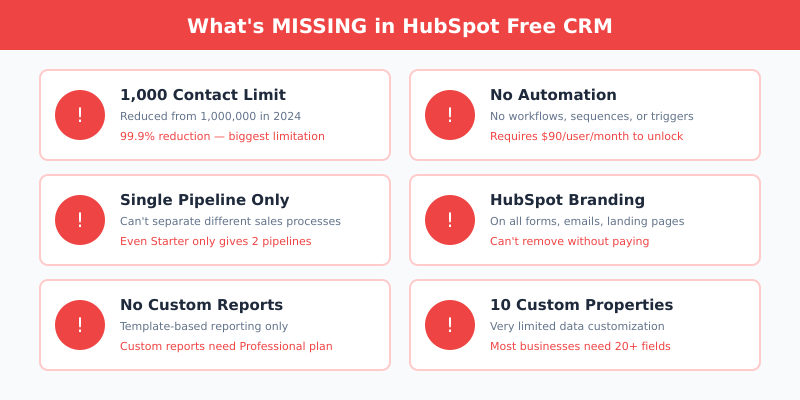
Here’s where HubSpot’s free plan falls apart for growing businesses. These limitations aren’t minor inconveniences — they’re deal-breakers for most teams.
The 1,000 Contact Limit
This is the biggest change. HubSpot used to allow 1 million contacts on the free plan. Now it’s 1,000. For context:
- A small email list hits 1,000 contacts in months
- Import one trade show list and you’re done
- Every form submission, website visitor, or imported contact counts
Once you hit 1,000 contacts, you’ll need to upgrade or start deleting people. Neither option is great.
Two Seats, and That’s the Team
The free CRM covers two users. For a founder and one salesperson, that’s workable. For a three-person sales team, it isn’t — and the moment you add the third seat you’re on Starter pricing for everyone, not just the new hire.
This limit catches people later than the contact cap does, and it hurts more, because by then the pipeline lives in HubSpot and there’s no clean exit. If you can already see a third or fourth seat coming this year, price that in before you import anything.
No Automation or Workflows
This is where HubSpot really gates value. On the free plan:
- No automated email sequences
- No workflows (automated actions based on triggers)
- No lead scoring
- No behavior-based nurturing
Want to automatically send a follow-up email when someone downloads your ebook? Real workflow automation lives in Sales Hub Professional, which HubSpot lists at $90 per seat per month on annual billing. This is the feature that makes CRMs useful — and on free it’s completely locked.
Limited Pipelines
You get exactly 1 deal pipeline. If you sell multiple products, have different sales processes, or need separate pipelines for different teams — you’re stuck. Even the Starter plan only gives you 2 pipelines.
HubSpot Branding Everywhere
Every customer-facing element shows HubSpot branding:
- Meeting scheduler links say “Powered by HubSpot”
- Forms include HubSpot branding
- Landing pages have HubSpot footer
- Marketing emails include HubSpot branding
Removing branding is the single clearest thing Starter buys you.
Weak Reporting
The free plan only offers template-based reports. You cannot:
- Build custom reports from scratch
- Create revenue attribution reports
- Analyze conversion funnels
- Export detailed analytics
Custom report building sits in the Professional tier.
Limited Customization
With only 10 custom properties, you’ll run out fast. Most businesses need to track:
- Lead source details
- Industry/company size
- Product interests
- Budget range
- Decision timeline
That’s already 5 properties. Add a few more for your specific needs and you’re maxed out.
Email on the Free Plan: Where It Stops
Email is the feature people most often assume is “included,” so it’s worth separating what works from what doesn’t.
What works. One-to-one email from the CRM, with tracking on opens and clicks, is genuinely good and it’s free. Gmail and Outlook integration means you can write from your normal inbox and still log everything against the contact record. You also get 2,000 marketing email sends per calendar month across the whole account — enough for a small newsletter or a modest announcement list.
Where it stops. Three limits show up fast:
- Three templates per account. Not three per user — three total. Two salespeople with different pitches will burn through that in a week.
- Every send carries HubSpot branding. On a prospecting email to an enterprise buyer, that footer says exactly how small your operation is.
- No sequences. A sequence is the automated multi-step follow-up that makes outbound work at all. On free, every follow-up is a task you remember to do, or don’t.
If email is the main job you’re hiring the tool for, a CRM’s free tier is usually the wrong shape for it. A dedicated email platform will beat it on deliverability, templates, and automation at a lower price — that’s the argument I make in detail when I write about choosing an email marketing tool without the demo hype. Use HubSpot free for the pipeline; send campaigns somewhere built for sending campaigns.
Free vs Starter: What the First Paid Tier Adds
Most people who outgrow the free plan don’t jump to Professional — they land on Starter and want to know if it’s worth it. Here’s the honest comparison of the two tiers:
| What you care about | Free | Starter |
|---|---|---|
| Price | $0 | From $7/seat/mo on annual terms; $20/seat/mo month-to-month |
| Users | 2 max | Buy as many seats as you need |
| Deal pipelines | 1 | 2 |
| Email templates | 3 per account | Effectively unlimited for a small team |
| HubSpot branding | On everything customer-facing | Removed |
| Workflows and sequences | None | Simple automation only |
| Custom reports | Templates only | Templates only |
My read: Starter is worth it for exactly two reasons — removing the branding, and getting past the two-seat ceiling. If neither of those is your problem today, Starter changes very little about your day. It does not give you workflows, lead scoring, or custom report building; those still sit in Professional at a materially higher price.
Watch the promotional pricing, too. HubSpot advertises Starter from $7 per seat per month with an annual commitment, which is new-customer pricing rather than the standing rate — the month-to-month list price is $20 per seat. Budget against $20, and treat anything cheaper as a discount you may not keep at renewal.
HubSpot’s Pricing When You Need to Upgrade
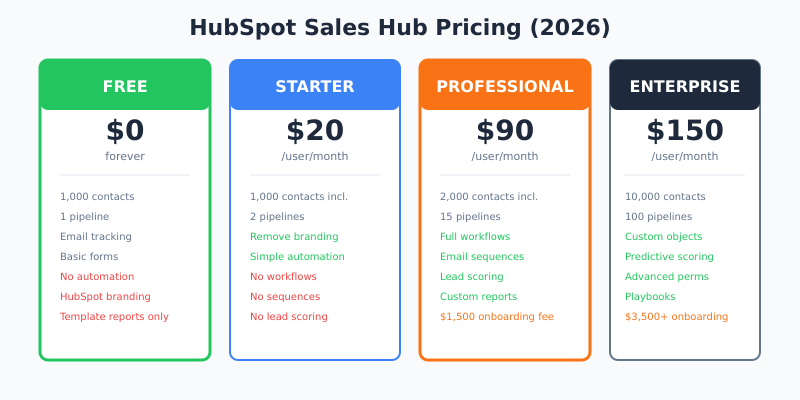
Here’s what you’ll pay when you outgrow the free plan, taken from HubSpot’s official Sales Hub pricing:
Sales Hub (CRM Features)
| Plan | Price | Key Features Added |
|---|---|---|
| Free | $0 | Basic CRM, 1,000 contacts, 1 pipeline, 2 users |
| Starter | From $7/seat/mo annual · $20/seat/mo monthly | Remove branding, 2 pipelines, simple automation, unlimited seats |
| Professional | $90/seat/mo annual · $100/seat/mo monthly | Workflows, sequences, custom reporting, lead scoring |
| Enterprise | $150/seat/mo | Advanced permissions, predictive lead scoring, custom objects |
Hidden Costs to Know
- Onboarding fees: Professional carries a required one-time onboarding fee of $1,500. Enterprise carries $3,500. These are not optional line items you can negotiate away on the self-serve path.
- Marketing contacts: Billed separately from CRM records. Marketing Hub Starter includes 1,000 marketing contacts, and going past that adds a per-block charge on top of your subscription.
- Multiple hubs: Need marketing AND sales features? You’re buying two subscriptions.
- Monthly billing premium: Paying month-to-month costs more per seat than committing annually — on Professional it’s the difference between $90 and $100 a seat.
A 5-person sales team on Professional? That’s $450/month for Sales Hub alone at the annual rate, plus $1,500 onboarding in month one, plus marketing contacts if you’re emailing at scale. It adds up fast.
Pros — What Works Well
Despite the limitations, HubSpot’s free CRM does some things right:
1. Genuinely Polished Interface
HubSpot has the best UX of any CRM I’ve used. Navigation is intuitive, the contact timeline is clean, and even non-technical users can figure it out quickly.
2. Strong Gmail/Outlook Integration
The email tracking actually works well. You see when contacts open emails, click links, and engage with your content — right in your inbox.
3. All-in-One Platform
Having CRM, email, forms, and basic marketing in one place is convenient. No juggling multiple tools when you’re starting out.
4. Excellent Free Resources
HubSpot Academy offers genuinely useful free courses. The certifications look good on LinkedIn and teach real skills.
5. Massive Integration Ecosystem
The HubSpot App Marketplace carries well over a thousand integrations. Most tools you already use probably connect to HubSpot.
Cons — What Disappointed Me
Here’s what frustrated me during my time with HubSpot Free:
1. The Contact Limit Change is Brutal
Going from 1 million to 1,000 contacts changed everything. This isn’t a free CRM anymore — it’s a trial with no expiration date.
2. Automation Locked at Every Turn
Every time I wanted to automate something simple — a follow-up email, a task reminder, a lead assignment — I hit a paywall. This gets exhausting.
3. The Upgrade Pressure is Constant
HubSpot shows upgrade prompts everywhere. Locked features are visible but greyed out. The free plan feels designed to frustrate you into paying.
4. The Jump to Real Automation is Steep
Starter buys you branding removal and extra seats. The features most teams actually want — workflows, sequences, lead scoring — sit at $90 per seat per month plus a $1,500 onboarding fee. There’s very little middle ground.
5. Vendor Lock-in Risk
Once your team learns HubSpot, your data lives there, and your processes are built around it — switching becomes painful. HubSpot knows this.
Who Should Use HubSpot Free CRM?
HubSpot Free works for:
- Solo founders and two-person teams with fewer than 1,000 contacts
- Freelancers tracking a small client base
- Teams evaluating HubSpot before committing to paid plans
- Side projects where manual work is acceptable
- Non-profits with minimal contact management needs
HubSpot Free is NOT for:
- Growing startups who’ll hit 1,000 contacts within months
- Sales teams of three or more people
- Anyone who needs email sequences or workflows
- Teams running multiple products or sales processes
- Budget-conscious teams who can’t absorb $90 per seat later
Is HubSpot the Best Free CRM?
It’s the best-designed one. It is not the most generous one, and those are different questions.
If your criteria are interface quality, integration count, and how quickly a non-technical person can be productive, HubSpot wins comfortably. If your criteria are seats, contacts, and how long you can stay on $0 without a wall, several competitors beat it — and the gap is not close. Two users and a thousand contacts is a tighter box than most free tiers in this category.
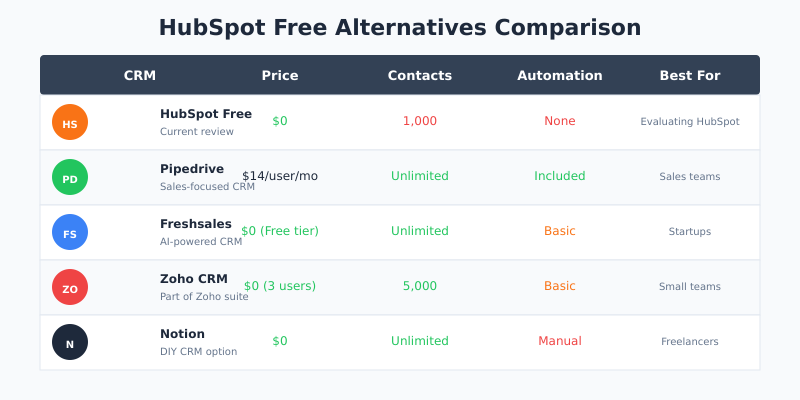
So the honest ranking depends on what “best” means to you. Here are the alternatives I’ve tested, with what each one does better:
Zoho CRM
Zoho CRM gives you a permanent free edition for 3 users with leads, contacts, deals, basic workflows and standard reports. That extra seat matters more than it sounds — it’s the difference between a founder-plus-one and a small team. Paid plans start at $14 per user per month on annual billing. Less polished than HubSpot, more generous where it counts.
Pipedrive
Pipedrive has no free plan at all — its entry Lite tier runs $14 per seat per month on annual billing, or $24 month-to-month. What you get for that is a sales tool with no marketing bolt-ons and no contact ceiling to babysit. For a pure sales team that was never going to use HubSpot’s marketing side, it’s often the better buy.
Freshsales
Freshsales used to be my standard “more generous free tier” recommendation. It no longer lists a free plan — the entry Growth tier starts at $9 per user per month on annual billing, with a 21-day trial to test it. Cheapest paid entry point of the three, so worth a look if you’ve already decided you’ll be paying.
A spreadsheet, honestly
If you have fewer than 200 contacts and one person doing sales, a spreadsheet is not the embarrassing answer people think it is. It’s free without limits, it exports cleanly, and it doesn’t lock you into anything. Move to a CRM when the spreadsheet starts costing you deals, not before.
My Verdict: Is HubSpot Free CRM Worth It?
HubSpot Free CRM is a capable but heavily restricted starting point. The interface is excellent, the integrations are strong, and for very small operations, it genuinely works.
But let’s be honest: this isn’t really a free CRM anymore. With 1,000 contacts, two seats, and no automation, it’s closer to an extended demo. HubSpot wants you to upgrade — and they’ve designed the free plan to make sure you will.
My recommendation:
- Use HubSpot Free if you’re one or two people, you’re evaluating the platform, and you plan to budget for paid plans eventually
- Skip HubSpot Free if you need a truly free, long-term CRM for a growing team — Zoho’s three-seat free edition is the more honest starting point
I buy and test every tool I review. HubSpot’s free plan taught me CRM basics years ago, and I’m grateful for that. But the free tier it built its reputation on no longer exists in the form people remember. What replaced it is a well-made, tightly capped on-ramp to a $90-per-seat product — fine if you walk in knowing that, painful if you find out at contact number 1,001.
Start with clear expectations: HubSpot Free is a trial, not a solution. For a solo operator or a pair, it still works. For everyone else, budget for the upgrade on day one, or start somewhere more generous.
FAQ
Is HubSpot CRM really free forever?
Yes, you can use the free plan indefinitely — but it’s limited to 1,000 contacts, 2 users, 1 pipeline, and no automation. There’s no time limit and no credit card required, but the feature restrictions push growing teams toward paid plans within 6-12 months.
How many contacts can I have on HubSpot Free?
HubSpot Free allows 1,000 contacts, reduced from 1 million previously. Once you exceed this limit, you’ll need to upgrade or delete contacts. This is the limitation most users hit first.
How many users can be on the HubSpot free plan?
Two. The free CRM covers up to 2 users on the account, and both get the full free feature set. Adding a third person means moving to a paid tier, and paid pricing applies per seat.
Why is HubSpot’s CRM free?
Because a CRM is the stickiest product a software company can sell. HubSpot gives away the layer that stores your data and creates switching costs, then charges for automation, reporting, and extra seats. A free tier is also a cheaper acquisition channel than paid search in an expensive keyword market.
Can I send marketing emails from the free CRM?
Yes, up to 2,000 email sends per calendar month account-wide, all carrying HubSpot branding. You also get 3 email templates per account and one-to-one email tracking. What you don’t get is sequences — automated multi-step follow-up requires a paid plan.
Is HubSpot Free worth it?
For one or two people with a short contact list, yes — it’s the best-designed free CRM available and it costs nothing to try. For a team of three or more, or anyone who needs follow-up automation, the ceilings arrive quickly enough that you should evaluate the paid pricing before you import your data.
Is HubSpot the best free CRM?
It’s the best-designed, not the most generous. Zoho CRM’s free edition covers 3 users where HubSpot covers 2, which matters for a small sales team. Choose HubSpot for interface and integrations; choose Zoho if you want to stay on $0 longer.
What’s the cheapest HubSpot plan with real automation?
Workflows, sequences and lead scoring live in Sales Hub Professional, listed at $90 per seat per month on annual billing ($100 month-to-month) with a required $1,500 one-time onboarding fee. Starter includes only simple automation.
Can I remove HubSpot branding on the free plan?
No. All free plan features — forms, landing pages, meeting links, and emails — include HubSpot branding. Removing it is the clearest thing the Starter tier buys, and it’s the reason most people upgrade.