Linear Review: The Project Tool Engineers Love
 Marcus Webb
8 min read
Marcus Webb
8 min read
Every engineer I know has a strong opinion about project management tools. Most of them hate Jira. And most of them love Linear.
I’ve spent the last 6 months using Linear with a product team, and I get the hype. It’s fast — absurdly fast. The interface is clean. Keyboard shortcuts make everything feel like a code editor. It’s what project management should feel like in 2026.
But Linear isn’t for everyone. It’s built specifically for engineering and product teams, and it shows. In this review, I’ll break down exactly what Linear does well, where it falls short, and whether it’s the right tool for your team.
What is Linear?
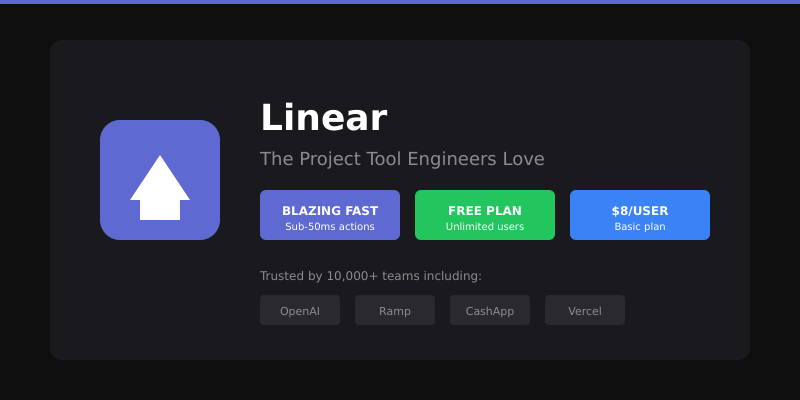
Linear is a modern issue tracking and project management platform built specifically for software development teams. Founded in 2019, it’s quickly become the go-to tool for startups and high-growth tech companies — including OpenAI, Ramp, and CashApp.
Think of Linear as what Jira could be if it was rebuilt from scratch in 2024. Same core functionality (issues, sprints, roadmaps), but with a focus on speed, simplicity, and developer experience.
Linear is built around three core concepts:
- Issues: Individual tasks, bugs, or feature requests
- Projects: Containers for related work (like a feature release)
- Cycles: Time-boxed sprints that automatically carry over unfinished work
What makes Linear different is the philosophy behind it. Every interaction is designed to complete in under 50 milliseconds. Real-time sync means your team sees changes instantly. Keyboard shortcuts let you navigate without touching your mouse. It feels like a tool engineers built for themselves — because they did.
The Features I Leaned On Daily
Issue Tracking That Doesn’t Suck
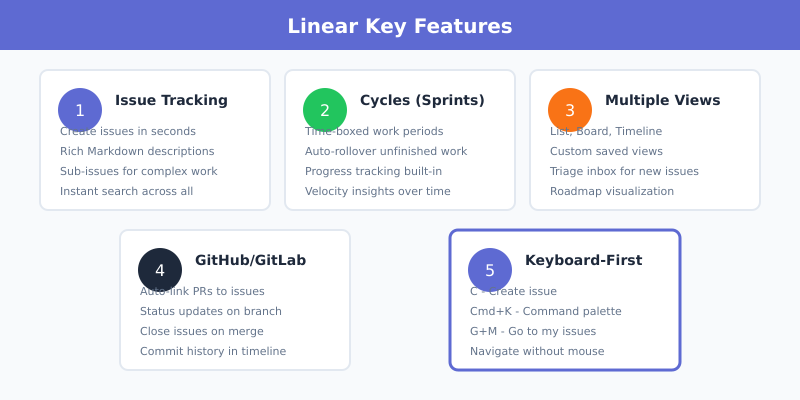
Linear’s issue tracking is its bread and butter. Creating an issue takes seconds — press C, type your title, add details, assign it, done. No modal dialogs, no page loads, no waiting.
Issues include:
- Rich text descriptions with Markdown support
- Assignees, labels, and priorities
- Sub-issues for breaking down complex work
- Comments with @mentions and reactions
- File attachments and linked documents
The best part? Issues are searchable instantly. Linear indexes everything, so finding that bug report from three months ago takes seconds, not minutes of scrolling.
Cycles (Sprints, But Better)
Linear calls sprints “Cycles” — typically one or two-week periods. What makes them better than traditional sprints:
- Automatic rollover: Unfinished issues automatically move to the next cycle. No manual cleanup.
- Progress tracking: See exactly how much work is done, in progress, or blocked.
- Velocity insights: Track your team’s output over time without complex configuration.
This alone saved our team hours of “sprint grooming” every two weeks. The cycle closes, work moves forward, and you keep building.
Views and Visualization
Linear offers multiple ways to view your work:
- List view: Dense, keyboard-navigable issue list
- Board view: Kanban-style columns by status
- Timeline view: Roadmap visualization for projects
- Triage view: Inbox for unassigned or incoming issues
Custom views let you save filtered lists — “My bugs,” “High priority this cycle,” “Blocked issues.” One click and you’re there.
GitHub/GitLab Integration
This is where Linear shines for engineering teams. Connect your repository and:
- Link pull requests to issues automatically
- Move issues to “In Progress” when a branch is created
- Close issues automatically when PRs merge
- See commit history directly in issue timelines
According to Linear’s documentation, the GitHub integration supports automatic status updates, branch creation, and PR linking — eliminating the manual work of keeping code and issues in sync.
Keyboard-First Navigation
Linear’s keyboard shortcuts are genuinely useful, not an afterthought:
C— Create new issueG then I— Go to inboxG then M— Go to my issuesX— Select issue for bulk actionsCmd+K— Command palette (search anything)
After a few days, you stop reaching for the mouse. Everything flows through keyboard commands. Engineers love this.
Linear Pricing Breakdown
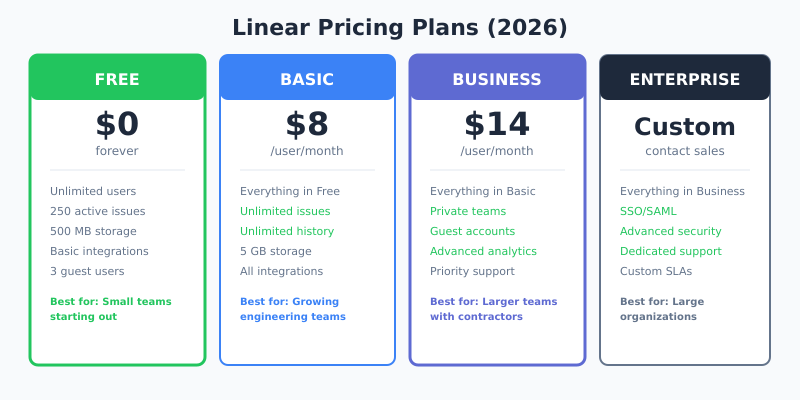
Linear’s pricing is straightforward compared to competitors. Here’s what you’ll pay in 2026:
| Plan | Price | Key Features |
|---|---|---|
| Free | $0 | Unlimited users, 250 issues, 500MB storage, basic integrations |
| Basic | $8/user/month | Unlimited issues, unlimited history, 5GB storage, all integrations |
| Business | $14/user/month | Private teams, guest access, advanced analytics, priority support |
| Enterprise | Custom | SSO/SAML, advanced security, dedicated support, SLAs |
Annual billing saves ~20%: Basic drops to $6.40/user, Business to ~$12/user.
Startup program: Early-stage startups through Linear for Startups get up to 6 months free on Basic or Business plans.
Non-profit discount: 75% off for registered charities and non-profits.
Compared to Jira ($8.15/user for Standard, $16/user for Premium), Linear’s pricing is competitive. But the real value is the time saved — less configuration, less administration, more building.
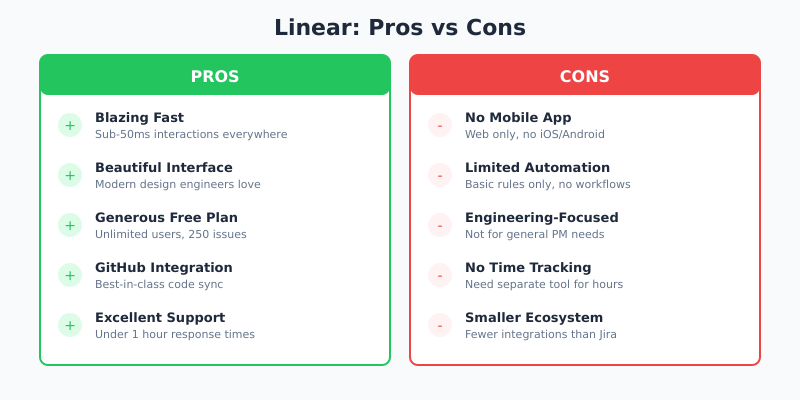
Pros — What Works Well
After 6 months of daily use, here’s what genuinely impressed me:
1. Speed That Actually Matters
Linear is absurdly fast. Every interaction — creating issues, switching views, searching — feels instant. This isn’t marketing speak. After using Linear, going back to Jira feels like wading through molasses.
2. The Interface is Beautiful
Linear looks like a modern app should look. Dark mode is default. Typography is clean. Information density is high without feeling cluttered. Engineers actually enjoy opening it.
3. Generous Free Plan
Unlimited users on the free plan is rare. I’ve seen startups run entire engineering teams on Linear Free for months. You only hit limits when you need unlimited issues or advanced features.
4. GitHub Integration Just Works
The bi-directional sync between Linear and GitHub is the best I’ve used. Create a branch, issue moves to “In Progress.” Merge a PR, issue closes. No manual updates.
5. Excellent Customer Support
Linear’s support team responds in under an hour. They’re technical, helpful, and actually listen to feedback. Multiple reviewers on G2 highlight this as a differentiator.
Cons — What Disappointed Me
Linear isn’t perfect. Here’s where it falls short:
1. No Mobile App
This is Linear’s biggest gap. There’s no native iOS or Android app. You can use the web app on mobile, but it’s not optimized. If your team needs to update tickets on the go, this is painful.
2. Limited Automation
Linear’s automation is basic compared to Jira or Monday.com. You can’t create complex workflows or conditional automations. Want to auto-assign issues based on labels? You’ll need to use the API or Zapier.
3. Engineering-Focused (Not General PM)
Linear is built for product and engineering teams. If you need company-wide project management — marketing campaigns, HR projects, finance workflows — Linear isn’t the right tool. You’ll need something like Asana or ClickUp alongside it.
4. No Time Tracking
There’s no built-in time tracking. If your team bills by the hour or needs to log time for project accounting, you’ll need a separate tool like Toggl or Harvest.
5. Smaller Integration Ecosystem
While Linear integrates with major tools (GitHub, Slack, Figma, Sentry), the ecosystem is smaller than Jira’s. Enterprise tools often have Jira integrations but not Linear support yet.
Linear vs Jira: The Real Comparison
Every Linear review has to address the elephant in the room: how does it compare to Jira?
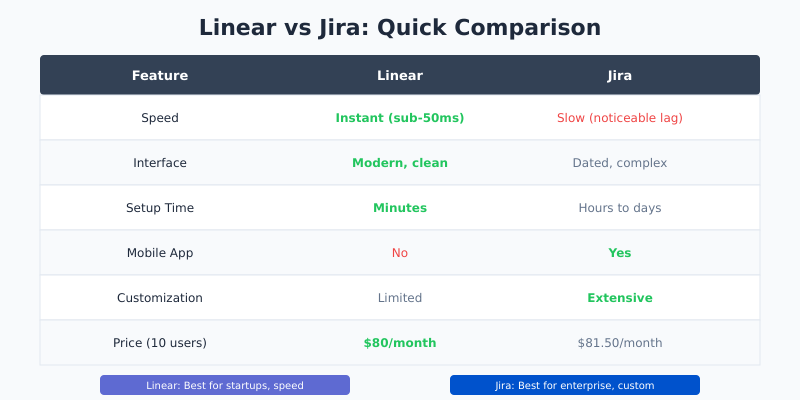
| Feature | Linear | Jira |
|---|---|---|
| Speed | Instant (sub-50ms) | Slow (notable lag) |
| Interface | Modern, clean | Dated, complex |
| Setup Time | Minutes | Hours to days |
| Learning Curve | Low | High |
| Mobile App | No | Yes |
| Customization | Limited | Extensive |
| Enterprise Features | Growing | Mature |
| Price (10 users) | $80/month | $81.50/month |
Choose Linear if: You’re a startup or mid-size company that values speed and simplicity over customization. Your team is engineering-focused and wants a tool that feels modern.
Choose Jira if: You’re an enterprise with complex compliance requirements, need extensive customization, or have non-technical teams that need project management.
As one reviewer on Efficient.app put it: teams using Linear “greatly enjoy using it” while Jira users typically respond with “it’s fine, I guess.”
Who Should Use Linear?
Linear is excellent for:
- Engineering teams of 5-200 people
- Product teams managing roadmaps and releases
- Startups that want to move fast without configuration overhead
- Teams migrating from Jira who want something cleaner
- Remote teams that need real-time collaboration
Linear is NOT for:
- Non-technical teams (marketing, HR, finance)
- Companies needing time tracking built-in
- Teams requiring heavy mobile access
- Enterprises with strict Jira-based compliance workflows
- Organizations needing complex automation rules
FAQ
Is Linear really free?
Yes, Linear’s free plan includes unlimited users, 250 issues, and basic integrations. It’s genuinely usable for small teams. You only need to upgrade when you exceed 250 issues or need features like private teams and advanced analytics.
Does Linear have a mobile app?
No, Linear doesn’t have native mobile apps for iOS or Android. You can access the web app on mobile browsers, but it’s not optimized for mobile use. This is one of Linear’s most requested features.
Can Linear replace Jira?
For engineering and product teams, yes. Linear handles issue tracking, sprints, and roadmaps well. For enterprises with complex workflows, compliance requirements, or non-technical teams, Jira’s customization may still be necessary.
How does Linear pricing compare to Jira?
Linear Basic costs $8/user/month. Jira Standard costs $8.15/user/month. They’re nearly identical in price, but Linear includes more on the free tier. For larger teams, annual billing discounts make Linear slightly cheaper.
Is Linear good for non-engineers?
Linear is designed for engineering and product teams. Non-technical teams can use it, but may find tools like Asana, ClickUp, or Monday.com more suitable for general project management, marketing campaigns, or company-wide workflows.
My Verdict: Is Linear Worth It?
Linear is the best issue tracking tool I’ve used for engineering teams. Period.
The speed alone is worth switching for. After six months, I can’t imagine going back to Jira’s loading screens and modal dialogs. Linear makes project management feel like it should — fast, focused, and out of your way.
But Linear isn’t trying to be everything. It’s specifically built for product and engineering teams, and it shows. If you need company-wide project management, time tracking, or complex automations, you’ll need additional tools.
My recommendation:
- Use Linear if you’re an engineering or product team that wants speed and simplicity
- Skip Linear if you need mobile apps, time tracking, or company-wide PM
Start with the free plan — it’s genuinely useful. Most teams will know within a week whether Linear fits their workflow. And if it does, the $8/user upgrade is an easy decision.
I buy and test every tool I review. Linear earned its place in my daily workflow, and it’s staying there.